Interview Questions

Monday, July 13, 2020

Cannot start AOS / Error: Cannot create another system semaphore.

Hi Friends,

Some time we found that after restoration of DB, one error popup during AOS start:
"Cannot create another system semaphore".

For this issue please find below solutions:
1- Open "SQL server management studio" as admin then select your master db and create below query-
update SQLSystemVariables
set value = '4'
where parm = 'SYSTIMEZONESVERSION'

After creation execute the query.
It worked for me.

2- check the user permission through which you are trying to start the AOS.

Thursday, March 22, 2018

How to use ternary operator in ax 2012

Hi All,

As we all know that we in some scenarios we need to use Ternary operator for reducing code lines. In a single line we can execute multiple cases.
For achieving this, please go through with below code.

Sample Job for ternary operator:

static void GOD_TernaryOperatorEx(Args _args)
{
    int a, b, c;
    ;

    a = 9;
    c = 8; 
         
    b = (a < 10 ) ? info ("Yes") : info ("No");
   In above line of code we are executing single condition or in other word we can say "If" Condition.
   In this condition we are just testing that "A is greater than 10 or not. If it is, then it will generate       info with "Yes"".

    Or

    b = (a < 10 ) ? ((a < c) ? info ("Yes") : info ("Nope")) : info ("No");
   In above line of code we are executing multiple conditions or in other word we can say "If and else if" Condition.
   In this condition we are testing that "A is greater than 10 or not. If it is not then it will print No, else it will again check that A is greater than "C" or not. If yes then it will print Yes else it will show Nope.
}

Tuesday, March 20, 2018

Use Temporary Table as form datasource in ax 2012

Hi All,

In many scenarios we need to use temporary table as form data source. So below steps are used to achieve this target.

Step 1 - Create a temporary table and make "Table Type" property as "TempDB"
Step 2 - Create a class to fetch or generate the data and insert into temporary table.
Step 3 - Create a method in class for executing your code.

For ex- 
public TempTableTmp  GenerateTempTable()
{
    TempTableTmp       tempTable;
    ;

    Write your logic and insert into temporary table then write below line:
    return tempTable;
}

Step 4 - Create a form and used temporary table created in step 1 as data source.

Step 5 - Override init method at form data source level.

Step 6 - In this method we need to instatiate the class which we have developed at step 2

For Ex - 
public void init()
{
TempTableClass temptableclass = new TempTableClass();

super();

tempTable = temptableclass.GenerateTempTable();

TempTableTmp.linkPhysicalTableInstance(tempTable);
//In above line if you will not use "LinkPhysicalTableInstance" method then you will not get the data on form.


Step 7 - Create a display type menu-item and place at your desired place.

It will solve your issue.

Thursday, December 21, 2017

How to create lookup method in ax 2012....

Hi Guys,

Scenario:
1- If you want to show any lookup on form's field
2- If master table field lookup you want to show in parent table 2 fields.
For ex-
You have Parent table "DiscountMaster" and field "MasterID"
and Child table "Discount Details" and fields "Discount Master ID", "Discount Code"

Now, if you want to show the lookup in fields "Discount Master ID", "Discount Code"
then normal solution is "you need to create relation with parent table" but whenever you will go to create normal relation between 2 fields of child table with 1 field of parent table then in the second record of relation will not show the complete lookup value. It will show only first field selected value in lookup. Then in this case you need to override lookup method:

For that please use below code;

public void lookup()
{
    Query query = new Query();
    QueryBuildDataSource queryBuildDataSource;
    QueryBuildRange queryBuildRange;

    SysTableLookup sysTableLookup = SysTableLookup::newParameters(tableNum(DiscountMaster), this);

    sysTableLookup.addLookupField(fieldNum(DiscountMaster, MasterID));

    queryBuildDataSource = query.addDataSource(tableNum(DiscountMaster));
 

    sysTableLookup.parmQuery(query);

    sysTableLookup.performFormLookup();

    //super();
}

it will solve your issue.

Note: Don't forget to remove relation with second field.

Tuesday, October 24, 2017

How to find SQL server version through AX 2012

Hi All,

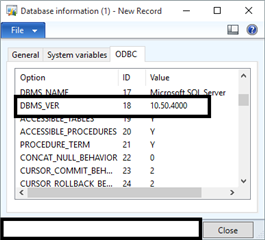
If any person wants to check SQL server version through AX then please follow below path:

Go to: System Administration > Inquiries > Database > Database information.
Open that form and go to ODBC tab and find DBMS _VER.

Monday, October 23, 2017

"Argument to method getfieldValue out of range" error in DMF in AX 2012

Hi All,

If any person will find error "Argument to method getfieldValue out of range" then we need to fill "Title Field 1 and Title Field 2" table properties of staging table created in private project:


It will solve your error.

Sunday, October 22, 2017

"SQL error description: [Microsoft][SQL Server Native Client 10.0][SQL Server]Invalid object name 'AX2012R2CU6_model.dbo.SYSMODELELEMENT" error while selecting table in lookup in ax 2012

Hi Guys,

If any person is getting error related with SQL:
"SQL error description: [Microsoft][SQL Server Native Client 10.0][SQL Server]Invalid object name 'AX2012R2CU6_model.dbo.SYSMODELELEMENT"

Then for this error we need to compile a "View" from AOT named "DMFModelElement".
It will solve your issue.

Other alternates is "Reinstall the DMF tool". (But in many cases this solution didn't worked)